Videoe AI Review: Next-Gen AI Video Generator with Audio (Powered by Google Veo 3)
Discover how Videoe AI transforms text and images into cinematic videos with audio, lip-sync, and multiple styles. Learn step-by-step guidance, pro tips, real applications, and innovative features like weekly credits, Veo 3 prompt hub, and chat mode.
Generate AI video with audio using Videoe AI.
What is Videoe AI?
Videoe AI is an advanced AI video generator, which can generate video with audio, powered by official Google Veo 3 model.
Unlike traditional tools that require editing skills or expensive software, Videoe AI allows you to simply type what you imagine—or upload an image as a reference—and instantly generate cinematic videos complete with synchronized audio.
It’s designed to help creators, educators, marketers, and businesses make professional-grade videos with ease.
Step-by-Step Guidance
Videoe AI offers two creation modes: Text-to-Video and Image-to-Video.
Text to Video
Step 1: Enter Videoe AI
Head over to Videoe AI and start your AI creation journey.
Step 2: Enter Prompts
Type your text prompt describing the video you want to create.
Step 3: Generate
Click Generate video and let the AI process the rest.
Step 4: Preview and Adjust
Preview the result, and regenerate if you want refinements.
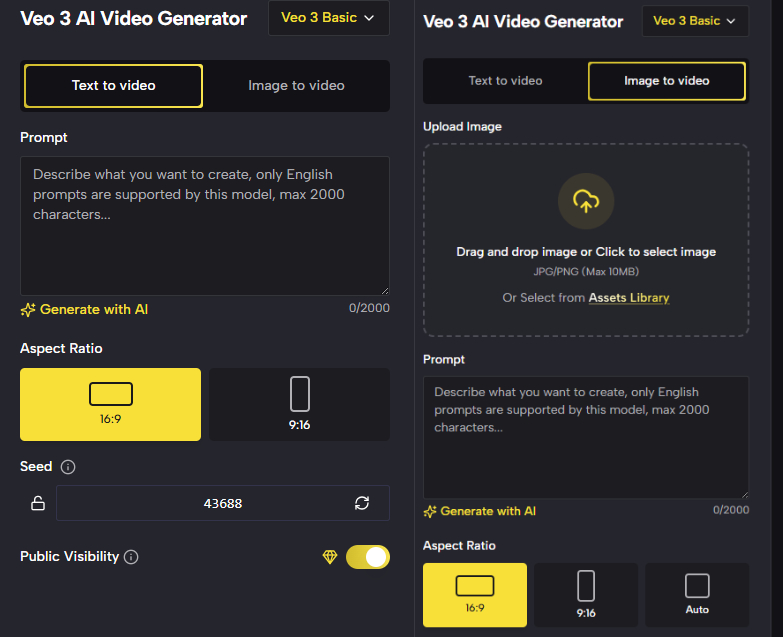
Image to Video
Step 1: Enter Videoe AI
Head over to Videoe AI and start your AI creation journey.
Step 2: Upload Image and Prompt
Upload an image as your reference, then add a supporting text prompt.
Step 3: Generate
Click Generate video to transform your static image into a moving story.
Step 4: Preview and Adjust
Preview and regenerate until you’re satisfied.
Both methods are beginner-friendly yet powerful enough for professionals.
Tips for Better AI Video
To get the best results from Videoe AI, you can follow the suggestions below:
No vague expressions
AI thrives on clarity. Instead of writing “a nice scene”, describe exactly what you want:
a golden sunset over a quiet beach, with gentle waves touching the shore.
a futuristic city skyline glowing with neon lights at night.
The more precise you are with details—colors, atmosphere, objects, actions—the more accurate and cinematic your video output will be.
Build context
Think of your prompt as a mini storyboard. Instead of writing one flat sentence, guide the AI through the flow of the video:
At dawn, a quiet mountain lake is covered in gentle mist.
First, the camera focuses on the still, glassy water reflecting the pale morning sky.
Gradually, golden sunlight begins to filter through the trees, illuminating the mist and revealing lush green forests along the shore.
Then, a flock of birds takes flight from the water’s edge, their wings sparkling in the morning light as the camera slowly pans upward to reveal snow-capped peaks in the distance. The atmosphere shifts from serene and mysterious to bright and vibrant, accompanied by the soft sounds of nature awakening.
This helps Veo 3 understand progression, transitions, and pacing—resulting in videos that feel dynamic and professional rather than static.
Specify language
Always write your prompts in English for the best model performance, but don’t forget to clarify if the output should use another language or cultural style. For example:
Two girls are chatting in a small cafe, the girl in black jacket said "I want to go New Zealand this summer holiday" in Korean and the girl with blond curl said " Me, too. I went to there last summer holiday with my parents. I still want to go back there." in Korean.
This ensures your video not only looks right but also sounds authentic for your target audience.
Avoid sensitive content
Veo 3 follows strict safety guidelines. Prompts that include violence, adult material, or illegal activity will be blocked. Instead of pushing boundaries, focus on creative, positive, or neutral themes that align with your project. This not only ensures smoother generation but also keeps your content safe for social media and commercial use.
Advanced Capabilities of Videoe AI Video Generator
Video with audio
Unlike many AI tools that require you to add sound separately, Videoe AI generates videos with built-in audio tracks. Whether it’s background music, narration, or natural sound effects, your video feels complete the moment it’s created—saving time and boosting professionalism.
Lip-sync consistency
For character-based videos, lip movements align smoothly with dialogue or implied speech. This lip-sync accuracy makes your characters more believable and ensures content feels natural, whether for ads, tutorials, or creative storytelling.
Immersive background sound
The AI doesn’t just generate visuals—it enhances them with ambient effects that match the setting. Imagine city traffic noises behind an urban scene, or soft waves accompanying a beach sunset. These soundscapes create a more cinematic and immersive experience.
Prompt optimization
Videoe AI is trained to interpret natural human language, not just technical prompts. That means you can describe your idea in plain English, and the system refines it into a polished output. This reduces endless trial-and-error cycles and helps you achieve your vision faster.
Custom video sizes
Easily generate content in the format you need:
-
16:9 widescreen for YouTube and presentations
-
9:16 vertical for TikTok, Instagram Reels, and Shorts
No matter your platform, Videoe AI adapts to your requirements.
Multiple styles
Choose from a variety of visual aesthetics—cinematic, realistic, animated, anime-inspired, or experimental. This flexibility allows you to maintain a consistent brand identity or experiment with fresh creative directions.
Unlimited camera angles
Simulate pans, zooms, aerial shots, and dramatic close-ups without needing physical equipment. Videoe AI gives you full cinematic control, allowing you to direct like a filmmaker and bring more life and motion into your storytelling.
Together, these advanced capabilities make Videoe AI not just a video generator, but a complete production studio powered by AI.
Real Applications of Videoe AI Video Generator
-
Ads: Quickly turn marketing copy or product images into engaging ad videos.
-
Social Media: Generate TikTok, Reels, or YouTube Shorts tailored to your audience.
-
Content Creators: Build consistent video styles for your channel or brand persona.
-
Educators: Turn lectures, slides, or key ideas into visual explainers.
-
Small Businesses: Create promotional content without hiring an agency or learning complex software.
The Innovative Features of Videoe AI
What truly sets Videoe AI apart from other AI video generators is its focus on usability, creativity, and intelligent assistance.
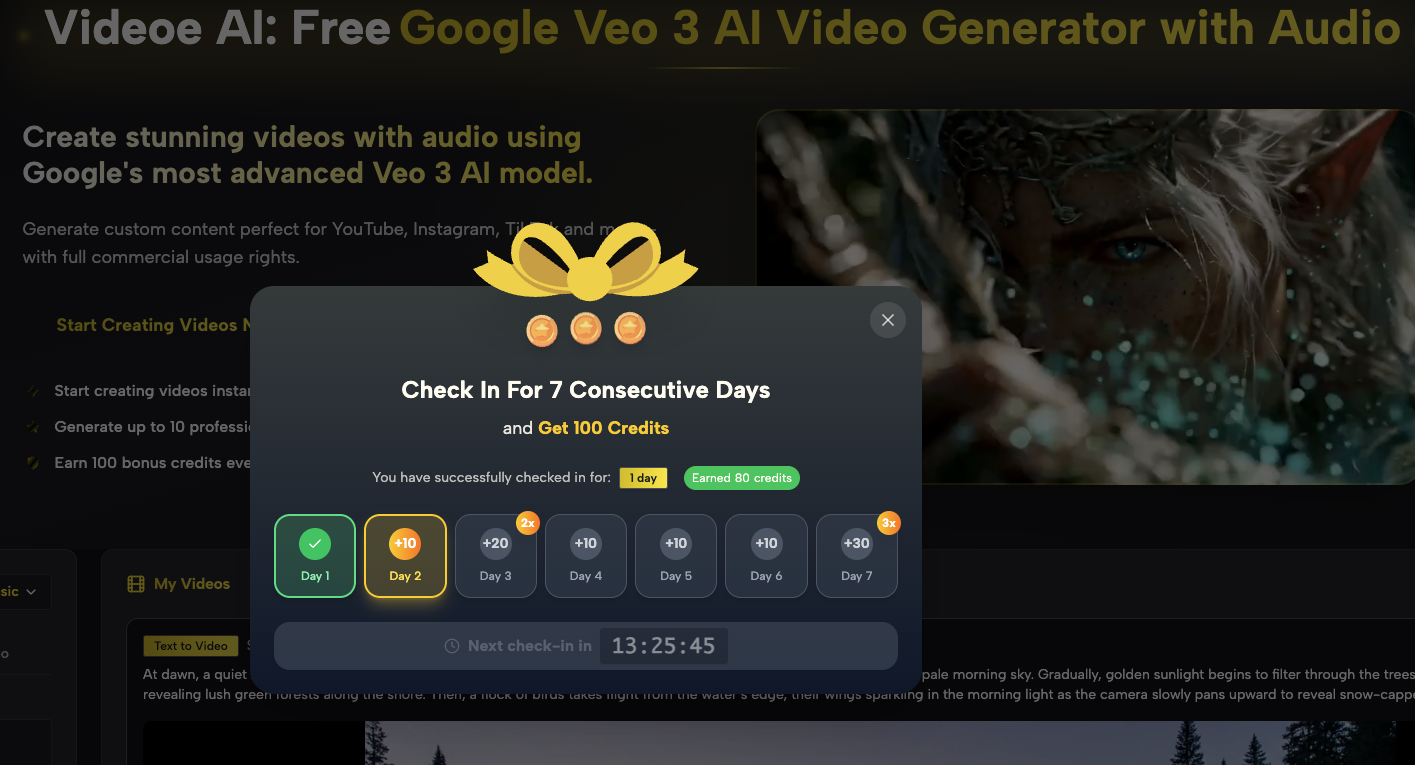
Check-in credits
Videoe AI rewards active creators. By simply checking in each week, you automatically earn 100 free credits.
This means you can keep experimenting and producing videos regularly—without worrying about costs piling up. It’s a sustainable way to create consistently.
Veo 3 AI Prompts
Not sure where to start? Videoe AI maintains a prompt hub filled with fresh, curated examples designed for the official Veo 3 model.
You can copy, tweak, and apply prompts instantly from the Veo 3 AI Prompt—perfect for quickly testing new ideas or adapting them to different scenarios like ads, tutorials, or storytelling.
Final Words
Videoe AI is more than just a video generator—it’s a creative hub powered by Google Veo 3. Whether you’re looking to boost your business with professional ads, grow your social media presence, or experiment with innovative storytelling, Videoe AI gives you the tools to make it happen effortlessly.
👉 Start your journey today at Videoe AI and turn your ideas into cinematic reality.